Technology · Inclusive design
Accessibility is not ‘easy mode’: how controllers redesigned skill
Skill is not two fast thumbs on one prescribed shape. From Xbox Adaptive Controller to PS5 Access and a new shared tag language, this is a practical guide to finding the barrier and buying only the input you need.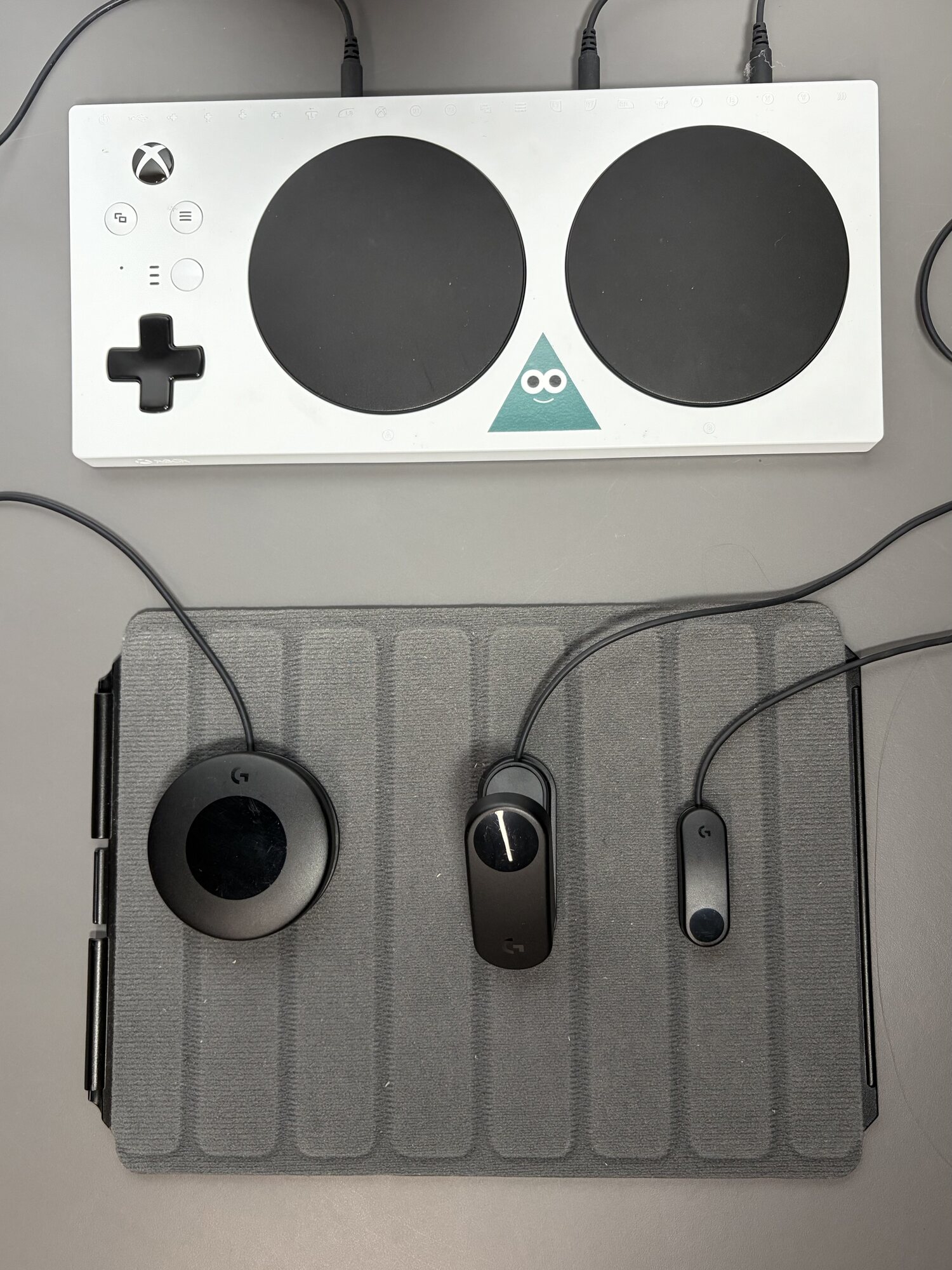
If a game reads your decision too late, did your skill fail—or did the input device fail to carry your intent? A conventional pad assumes a particular grip, range of motion and ability to press controls together. Those are design choices, not laws of play.
Adaptive controls do not play for someone. They redistribute commands so intention can reach the game. Removing an unnecessary physical exam is not removing skill; it lets the intended challenge become visible.
Start with the difficult action, not a diagnosis
The useful question is not ‘what is the best disability controller?’ It is ‘which action ends the session?’ Holding a button, reaching a shoulder input, moving a stick while pressing, or sustaining a grip can each point to a different solution.
Map one real session: essential commands, comfortable actions and actions that need another route. Try remapping, toggle and sensitivity settings before buying hardware. If pain, injury or positioning is involved, qualified individual advice is safer than a general product review.
Xbox Adaptive Controller is a hub for intent
Xbox describes the device as a unified hub for inputs. Its current specification lists nineteen 3.5mm and two USB 2.0 external-input ports, with button remapping and profiles in Xbox Accessories. Multiple profiles can be created, with three available from the built-in Profile button.
The point is not the port count by itself. A large button can sit near the head, a light switch under a foot and a joystick in a fixed position, then appear to the game as one controller. The hub is not a complete kit for everybody: switches, mounts and other devices are usually separate, and compatibility, actuation force and cable routing need testing.
PS5 Access: the circle with no mandatory direction
Access Controller can be placed in any 360-degree orientation, on flat surfaces, wheelchair trays or an AMPS mount. Interchangeable button and stick caps change shape and texture, while four standard 3.5mm ports accept additional inputs.
PlayStation supports two Access units as one virtual controller, or Access alongside DualSense. PS5 can configure up to 30 profiles and store three on the device; inputs can toggle, two commands can share one button, and accidental buttons can be disabled. Even the box is designed for one-handed, low-effort opening—access starts before setup.
From hardware to a shared storefront language
The right input does not reveal whether a game offers narration, button holds, reduced time pressure or readable subtitles. EA, Google, Microsoft, Nintendo, Sony and Ubisoft helped form the Accessible Games Initiative to publish shared feature tags players can inspect before buying.
The tags have appeared across Xbox digital experiences since July 2025, and Ubisoft began a progressive rollout in May 2026. That is confirmed progress, not certification that every tagged game fits every player. A tag describes a published feature; the detail still matters, because ‘subtitles’ alone says nothing about a reader’s required size.
The myth: one controller makes every game accessible
There is no universal setup. Barriers can be motor, visual, auditory or cognitive, and capacity can change during a day. An excellent motor-input hub cannot repair a menu without narration; strong captions do not fix repeated rapid presses.
An ‘adaptive’ label also does not guarantee that every 3.5mm switch, mount or platform works together. Verify jack purpose, power, mounting, remapping, exact model and returns. Buy the smallest reversible experiment, then expand only after real sessions.
PLAYLORE FIELD NOTE
The four layers that must agree
A successful setup is a chain: player, input, game rules and physical environment.| Layer | What changes | Example | Question before purchase |
|---|---|---|---|
| Hardware | Input position, size and force | Xbox Adaptive plus switches | Which movement am I replacing? |
| Control profile | Remap, toggle and combine | Separate Access profiles for driving and combat | Can I store and switch it easily? |
| Game | Captions, timing, vibration, difficulty, UI | Accessible Games Initiative tags | Is the description current and specific? |
| Environment | Mount, surface, cable and reach | AMPS mount or fixing mat | Will it stay stable and safe? |
SETUP GUIDE
Test the setup before a large spend
Build around one real play session, not a complete-looking marketing photograph.- Record the actions that cause fatigue or block progress in one specific game.
- Test remapping, toggles, stick sensitivity and in-game assists before new hardware.
- Choose the primary platform; Xbox, PS5 and PC do not share every rule or accessory.
- Match connector purpose, power, mount and exact model—3.5mm does not automatically mean universal input.
- Plan cable routes, mounting surface and access to system controls before adding switches.
- Use a clear warranty and return policy, then test comfort in short sessions before expanding.
Two tools only when they solve a named barrier
Amazon.sa comparison searches, without retailer images or unverified prices. Confirm platform, model, ports and returns before purchase.
Xbox Adaptive Controller
A potential hub for Xbox/Windows setups that need external switches or joysticks; most extra inputs are separate.
Compare on Amazon.saLogitech G Adaptive Gaming Kit
External buttons and triggers; verify the exact kit explicitly supports your Access Controller or Xbox Adaptive setup.
Compare on Amazon.saAs an Amazon Associate I earn from qualifying purchases.
Primary sources
Sources and verification
Specifications come from the platform holders and official initiative. The real photograph is licensed CC BY-SA 4.0 with creator and rights-page credit.- Xbox — Xbox Adaptive Controller specifications
- PlayStation — Access Controller features
- Xbox — current Adaptive Joystick specifications
- Microsoft — Xbox Accessibility Guidelines
- Accessible Games Initiative — tags and participating companies
- Accessible Games Initiative — Ubisoft’s 2026 rollout
- Wikimedia Commons — InclusiveGameLab photograph and CC BY-SA 4.0 licence
PLAYLORE VERDICT
Skill is the decision, not the shape of the finger
When a player chooses timing, plan and route, the input should carry that decision with as little noise as possible. A larger button or toggle does not create the win; it prevents the device from swallowing the decision before it reaches the game.
Start with one barrier and the smallest adjustable setup, then let real play lead the next change. The best adaptive technology is not the kit with the most parts. It is the one that disappears from attention and makes the screen a place to play again.